Caffeinated Bitstream

Bits, bytes, and words.

Networking

Rapid DHCP Redux

I was surprised at the amount of attention attracted by my recent post,"Rapid DHCP: Or, how do Macs get on the network so fast?". Between the 27 comments on my post and the 180 comments on Hacker News, a lot of interesting insights surfaced about the Mac's approach to DHCP. Information that would have taken me a week or two to research arrived within hours from people with experience in these matters. Here are some of the highlights:


One of life's minor annoyances is having to wait on my devices to connect to the network after I wake them from sleep. All too often, I'll open the lid on my EeePC netbook, enter a web address, and get the dreaded "This webpage is not available" message because the machine is still working on connecting to my Wi-Fi network. On some occasions, I have to twiddle my thumbs for as long as 10-15 seconds before the network is ready to be used. The frustrating thing is that I know it doesn't have to be this way. I know this because I have a Mac. When I open the lid of my MacBook Pro, it connects to the network nearly instantaneously. In fact, no matter how fast I am, the network comes up before I can even try to load a web page. My curiosity got the better of me, and I set out to investigate how Macs are able to connect to the network so quickly, and how the network connect time in other operating systems could be improved.


Testing multicast support on Android devices

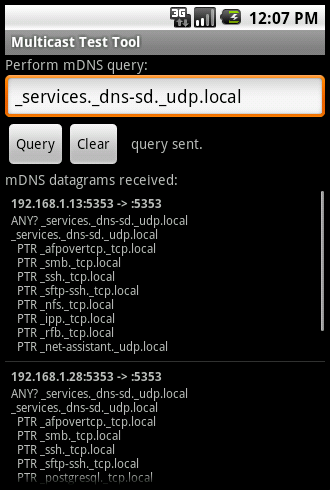
In my previous post, I mentioned my frustration that certain Android phones (including my HTC EVO) cannot receive multicast datagrams. I'd like to get feedback from my friends and colleagues about multicast support on their phones, so I wrote a simple app for testing multicast.

The Multicast Test Tool continually monitors the network for Multicast DNS (mDNS) packets while the app is running in the foreground, and presents the contents of these packets to the user. The app also allows the user to perform simple mDNS queries on the local network. If you run the app and touch the "Query" button, it will query for the default _services._dns-sd._udp.local name, which will solicit mDNS responses from devices on your network that advertise services via mDNS.


Broken multicast networking on HTC smartphones

It looks like some (most?) HTC phones running Android, such as my HTC EVO, are not capable of receiving multicast or broadcast datagram packets over the Wi-Fi network. This means that apps which rely on such communication will fail, often with no indication of the problem. From the app's perspective, no obvious error is happening — it can only assume that no other devices on the network are transmitting such datagrams. Multicast communication is becoming increasingly common as a technique for devices to discover each other on a network, and the absence of this capability represents serious breakage that leaves apps crippled. Examples of resources an app might use multicast to discover are: