Fork me on GitHub

Caffeinated Bitstream

Bits, bytes, and words.

Testing multicast support on Android devices January 31, 2011

In my previous post, I mentioned my frustration that certain Android phones (including my HTC EVO) cannot receive multicast datagrams. I'd like to get feedback from my friends and colleagues about multicast support on their phones, so I wrote a simple app for testing multicast.

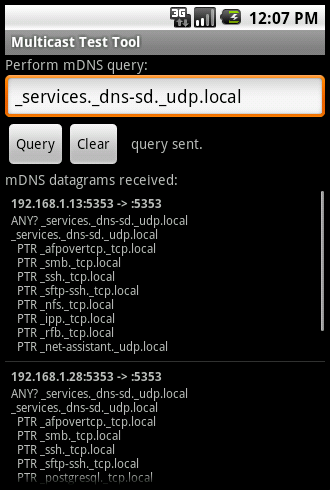
The Multicast Test Tool continually monitors the network for Multicast DNS (mDNS) packets while the app is running in the foreground, and presents the contents of these packets to the user. The app also allows the user to perform simple mDNS queries on the local network. If you run the app and touch the "Query" button, it will query for the default _services._dns-sd._udp.local name, which will solicit mDNS responses from devices on your network that advertise services via mDNS.

Mac and Linux machines will respond to this discovery query. Windows machines will also respond if you are running iTunes and have checked "Share my library on my local network" in the preferences. If you think your network may not have any of these devices which support mDNS service discovery, you can run the attached perl script to transmit a gratuitous mDNS packet.

You can also query specific hosts using the format <hostname>.local. My home network is always buzzing with mDNS traffic, so on my multicast-capable virtual machine I see lots of activity without performing any queries.

If you see any activity at all, it means that your phone supports multicast. If you see no activity, then your phone likely does not support multicast.

Downloads

  • multicast_test.apk - This is the Multicast Test Tool app, which you can download and install on your Android phone.
  • send_mdns.pl - This perl script transmits a single mDNS packet, which should be detected by the Multicast Test Tool. This is only needed if you don't already have devices on your network (Macs, Linux boxes, etc.) which implement the mDNS service discovery protocol.
  • multicast_test_tool.tar.gz - The source code for the Multicast Test Tool. This is only needed if you are curious about the inner workings. (Added 2011-02-02.)
Comments:

I tested it on my Samsung Epic 4G and your app could see mDNS packets on my phone. Tested this on wife's Samsung Vibrant which is a very similar phone. And it too could see mDNS packets from my home network without querying.

Posted by Cheema on January 31, 2011 at 07:28 PM MST #

Is the source code for the android app available? I've been learning about mdns and would like to see how you did it.

Posted by Edward on February 01, 2011 at 04:51 PM MST #

Edward - I just added the source code to the "Downloads" section above.

Posted by David Simmons on February 02, 2011 at 05:06 PM MST #

Thanks David, I grabbed the source and will take a look at it.

Posted by Edward on February 08, 2011 at 11:57 AM MST #

Works on my Samsung Galaxy S running 2.2

Posted by Jean-Lou Dupont on February 21, 2011 at 07:24 PM MST #

Hi I tried this on my Droid2global and Droid X it doesn't work. I don't see any packets coming on the way. Does that mean the device doesn't support multicast?

Posted by Thameem on February 22, 2011 at 12:15 PM MST #

Thameem - It's possible that you may not have any multicast activity on your network. (Or devices that respond to the mDNS service discovery.) If you have a computer with Perl, you can try the send_mdns.pl script to transmit a multicast packet. If you don't see the packet in the app, then your phone probably does not support multicast.

Posted by David Simmons on February 22, 2011 at 12:20 PM MST #

Thanks for the quick reply. I tried sending the packets using the perl script but same reply. I am doubting about my router. I am using the buffalo router http://www.buffalotech.com/files/products/whr-hp-g300n_DS.pdf and I read that most of the home routers doesn't support multicast as its not mandatory in IPv4 but its in IPv6. If this is the case the other option is to use the broadcast. Do you have any input on using broadcast as safer solution? Thanks.

Posted by Thameem on February 22, 2011 at 12:47 PM MST #

I haven't tested many routers, so this is just a guess. I think that even routers that don't officially support multicast should be able to handle this sort of "dumb" multicasting. This is because no actual routing is necessary — your router is probably just bridging your wired and wireless network links. Full multicast support is needed when you want to route multicast to/from the upstream network, for applications such as IPTV. It's possible that your router could be filtering multicast to reduce unnecessary wireless traffic.

When debugging these sorts of network issues, it is invaluable to use a packet sniffer such as tcpdump or Wireshark to see exactly what is happening on a host's network interface.

I'm not sure what your need is, so it's hard to say if broadcast is a better solution. (Keep in mind, though, that phones with multicast problems may have the same problems with broadcast.)

Posted by David Simmons on February 22, 2011 at 01:11 PM MST #

The router runs ddwrt and i disabled the "Filter Multicast" but still not working. I am sending the packets using perl script from my laptop which also in wifi but i don't see anything in device. Is there any tool i can attach to ADB to monitor the network coming to phone? Thanks.

Posted by Thameem on February 22, 2011 at 01:15 PM MST #

Some people seem to be able to run tcpdump on their Android devices via adb, but this may require you to have a rooted phone.

If you do use a tool like tcpdump to inspect wi-fi traffic on the phone, keep in mind that you may need an app like Multicast Test Tool running, so the wireless chip in the phone knows to change its hardware filtering to allow multicast. (It's a problem with this dance between the wireless chip and the operating system that keeps multicast from working on my HTC phone.)

Posted by David Simmons on February 22, 2011 at 01:26 PM MST #

I assume they do support mcast in IPv6, yes ... ?

Posted by TJ on July 12, 2011 at 03:37 PM MDT #

TJ - My HTC EVO phone, which has the multicast problem, also doesn't support IPv6. In fact, the only Android device I own that supports IPv6 is a Honeycomb tablet. (Maybe some of the newer Android 2.x releases support IPv6, I dunno...)

Posted by David Simmons on July 12, 2011 at 03:41 PM MDT #

Ah, my Android devices are all 2.x or higher and can do IPv6 over wifi ... someday I will have LTE, so IPv6 over cellular as well.

Posted by TJ on July 12, 2011 at 04:04 PM MDT #

I was doing some Android debugging at a friend's house last night, and to my complete astonishment, both multicast and IPv6 suddenly started working on my HTC EVO phone! It makes me wonder if my wireless access points are mangling the multicast packets or my IGMP joins or something.

For a while I just assumed that Android 2.x didn't support IPv6. That could explain some strange looks I got at Google IO when telling people "Hey, look, Honeycomb finally supports IPv6!" heh.

Posted by David Simmons on July 14, 2011 at 06:10 PM MDT #

We've been having multicast reception problems with the HTC EVO 4G for a while now. An OTA udpate on June 20th appears to have fixed the problem (same phone, same SW, didn't discover before the update, works fine now). Perhaps that's why you're receiving multicast packets now. Also, a coworker's HTC Hero running 2.1 is receiving multicast, but we never tried it before today.

Posted by Pat Wood on August 03, 2011 at 04:07 PM MDT #

Hi, I've tested your app with an emulator on my MacBook Pro and it works correctly. After I run your app on my Nexus S with Android 2.3.6 and it doesn't see any service at all. Obviously, my MacBook and the Nexus S are connected on the same Wi-Fi. I think that the problem is on my Nexus S. But I can't think that it doesn't support the multicast. Any ideas? Many thanks

Posted by Paolo on September 29, 2011 at 06:27 AM MDT #

Paolo - I would also be surprised if the Nexus S didn't support multicast.

I've heard that some wireless access points (and wired switches) may interfere with multicast traffic. Some may outright block multicast, while others may employ IGMP snooping to only forward multicast packets to interested hosts. The Multicast Test Tool does invoke joinGroup() on the socket to subscribe to mDNS traffic, which should theoretically send an IGMP "join group" message that such WAPs should recognize.

You might want to try using a different Wi-Fi network to see if it makes a difference, or poke around in the settings of your access point. Running a packet sniffer from another computer on the Wi-Fi network may also yield some interesting results.

Due to the widespread sloppiness of multicast support in phones and WAPs, I've relegated multicast discovery functions to a "nice to have if it works" feature in my apps, instead of something that must be relied upon.

Posted by David Simmons on September 29, 2011 at 10:43 AM MDT #

Hi Mr. Simmons, thank you for your reply. I've tested your app on my home wi-fi and it works.... I think it's a problem of the network device of my Nexus S. In my office your app it doesn't work on Nexus S, but when I test it on the emulator ( the same wi-fi ) it works correctly. I've a similar app on the iPhone and it works correctly ( this for say that it is not a switch or access point problem ). So, I think that Android in general has not a fully stable support for multicast dns, and Nexus S has some limitations on the network device driver ( such as filter of packet to save the battery as you have mentioned). Are you agree with me? Thanks

Posted by Paolo on September 30, 2011 at 03:03 AM MDT #

Just make sure the emulator system is only connected to the wifi, and isn't connected to both wifi and hard-wired ethernet (I usually connect my laptop to the office ethernet, and it also connects automatically to the wifi). If the device(s) you are attempting to discover via mDNS are on the wired subnet and the wireless device is on a different subnet (or the wireless router is not configured to bridge the multicast packets between the wired and wireless sides of the same subnet), the app won't work.

Posted by Pat Wood on September 30, 2011 at 08:23 AM MDT #

Paolo - I think the Android operating system theoretically supports multicast fine, but the sloppiness in the drivers and/or firmware supplied by the manufacturers can make it hard for Android apps to rely on multicast in practice. The Android API supplies a WifiManager.MulticastLock() method which the app calls to ask the driver/firmware to disable any hardware multicast/broadcast packet filtering, but this doesn't seem to help on certain devices. Apple invented and relies on mDNS, so I would expect multicast to be very reliable on iOS devices.

It seems to me that the multicast weirdness may be a combination of the device's driver/firmware, and the network infrastructure. My HTC EVO failed the multicast test on most networks, but surprisingly worked at a friend's house. Unfortunately, my EVO is now kaput, so I can't perform any more tests on this behavior.

Posted by David Simmons on September 30, 2011 at 10:55 AM MDT #

Hi Mr. Simmons, thank you for your work! It's brilliant! I am developing an app for nexus one and I faced this problem of "unable to join multicast group" despite using a standard multicast group ip address. Wondered if u ever face this problem in your code development. Any ideas? Thank you so much!! :)

Posted by pete yam on January 22, 2012 at 09:12 PM MST #

Pete - Are you getting this "unable to join multicast group" message in an IOException when you call MulticastSocket.joinGroup()? I've never seen such an error -- on problematic phones, the joinGroup() always appears to succeed.

Posted by David Simmons on January 23, 2012 at 12:36 PM MST #

Thank you for this lightweight example. Implemented without mDNS-Daemon or jmDNS - great! I removed the specific IP of the MulticastSocket and it workes great in the emulator with a Bonjour-service on the host-pc. But I removed the /*if (oldoffset != buffer.offset) { throw new DNSException("bad PTR rdata"); } */ in DNSAnswer.java because this failed for me most times. Are there any updates? Kind regards, Martin Meel

Posted by Martin Meel on January 25, 2012 at 06:35 AM MST #

Post a Comment:
  • HTML Syntax: Allowed