Fork me on GitHub

Caffeinated Bitstream

Bits, bytes, and words.

Nest Learning Thermostat: Installation, battery issues, and the importance of the "C" wire August 30, 2012

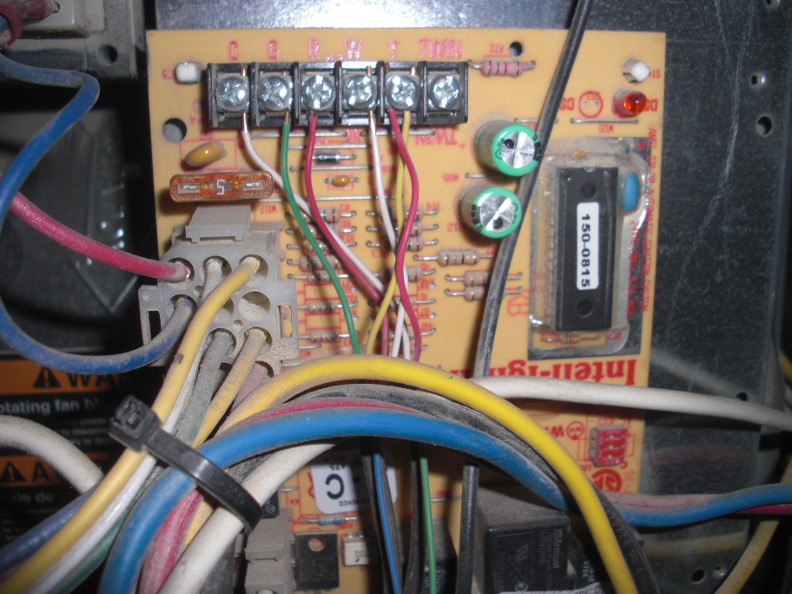
My furnace's control board. The "C" terminal has no connection to the thermostat in this picture. (The white wire on the C terminal goes to the A/C.) I connected the unused blue wire (bottom center) to the C terminal.
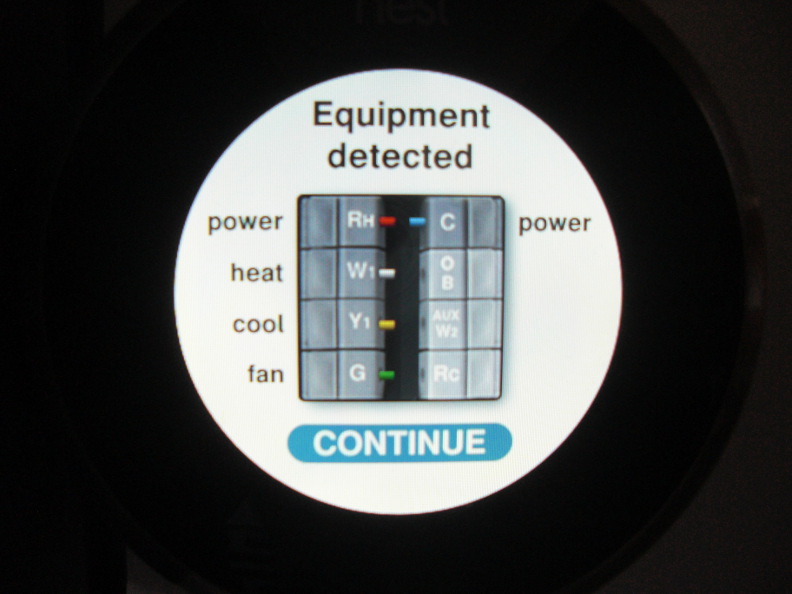
The Nest now confirms the active "C" wire.

I recently bought and installed a Nest Learning Thermostat to replace my old non-networked thermostat. I show the installation, demonstrate control from mobile devices, and provide a general review in the above video.

It's been about a month since I installed the device, and I found one important issue yesterday. My Nest dropped off the network for 7 hours, and upon investigation I discovered that the battery was low and it turned off the Wi-Fi radio to save power. Many other people have reported problems with the battery, which is scary because your thermostat is one device that you absolutely want to work 24/7 -- you don't want your pipes freezing when you leave town and the Nest decides to run out of juice!

It turns out that my thermostat wiring, like in many homes, does not provide a "C" wire (common 24VAC) for completing a circuit that provides constant power to the unit. This sort of wiring worked great for old-fashioned mercury thermostats -- it provides a red 24VAC power wire, and "call" wires for turning on the fan, heat, and air conditioning. When the thermostat needs to turn on one of those appliances, it simply closes the circuit between the red wire and the relevant call wire. Smart thermostats rely on batteries to power their smartness when no circuit is closed. When an appliance is running (i.e. one of those three circuits is closed), it can perform "power stealing" to sap power from the closed circuit for its operation and recharging the battery. For simple programmable thermostats, power stealing is probably sufficient. However, for a power-hungry device like the Nest that needs to operate a Wi-Fi radio, this mode of operation can be problematic for several reasons:

  1. If you live in a nice place like Colorado where you can open the windows and go days without using the heater or air conditioner, the control circuits are never closed and the Nest's battery doesn't have an opportunity to recharge.
  2. Power stealing is an imperfect backwards compatibility hack, and can't necessarily provide enough current to recharge the battery even when the appliances are operating. This is because the current may be limited by resistance in your furnace's control board.
  3. When the HVAC appliances are not running and the battery needs to be charged, the Nest performs an even worse hack than power stealing: it pulses the heater call circuit on and off very quickly to steal some power, and hopes that the pulses are short enough to keep the furnace from activating. I haven't noticed any problem with this, but at least one person has found that this wrecks havoc on their heater.
  4. The Nest uses a "Power Saving Mode" of Wi-Fi to reduce the power consumption of the radio and prolong the battery life. (And hopefully require less overall power than it can steal from the call circuits.) Nest indicates that some non-conformant wireless access points may not fully support this mode, thus causing the Nest to consume more power. (Perhaps more quickly than it can be replenished.)

I was lucky that my thermostat wiring contained an extra, unused (blue) wire, and my furnace's control board provided a 24VAC common terminal for a "C" wire. After hooking up the blue wire at the furnace and the Nest's base, I now seem to have successfully provided a 24VAC "C" wire to the Nest, and hopefully my battery issues are behind me.

I do think that Nest is perhaps overly optimistic about their power stealing and circuit pulsing being able to provide adequate power to the device. There's certainly no warning about this potential issue when you provide your wiring information to their online compatibility tool.

References

Comments:

U mentioned that you connected your extra blue wire to the "C" terminal. When you were done does that mean you had the white ac wire and the blue wire connected to the "c" terminal on the board connected to furnace? Thanks for your help in advance!

Posted by Todd on October 08, 2012 at 06:32 PM MDT #

Todd -- Sorry for the late reply. Yes, I now have both the white wire and the blue wire connected to the "c" terminal. The other day, I pointed this out to a furnace repairman who was looking at my furnace concerning an unrelated issue, and he confirmed that was exactly the right thing to do.

Posted by David Simmons on November 21, 2012 at 02:28 PM MST #

Heating system have color a code c = black, it would help some one in the future working on your system to mark both wires in question black/c.

Posted by Bill Macfarlane on November 25, 2012 at 06:39 PM MST #

This post was great info, David. I was experiencing the exact issue you described here...my battery on the nest was too low to connect to WiFi because it wasn't charging enough on heating cycles. I have connected a full-time 24 volt supply as you described and all seems fine now. I will ping back if I have problems. I wish Nest had better info on this...

Posted by David Mickelson on January 06, 2013 at 08:21 PM MST #

Hi David, Could you post the wiring connections done under the nest itself if its not too much trouble? Also will keeping the fan ON rather than AUTO also work? Thanks in Advance

Posted by John on January 21, 2013 at 04:56 PM MST #

You may want to indicate which version of the Nest stat you're running. In the fall of 2012, Nest released its second generation thermostat which resolves battery issues and more.

Posted by Nest User on January 24, 2013 at 09:57 PM MST #

Thanks so much for taking the time to post this. I recently bought a SECOND GENERATION Nest and ran into the same battery problems you did. Luckily, my thermostat had an extraneous/unused blue wire that started feeding power to my Nest when I connected it to the 'C' terminal (on the Nest) and the 24Vac terminal (on my thermostat). Thanks again!

Posted by Brady T on February 06, 2013 at 10:17 AM MST #

Thank you for this! I just installed the Nest in my house, and Have NOT had any issue, however while researching about the device, I came across your page, and realized I too had no 'C' wire, but had a surplus blue wire. I just connected the blue wire to the C terminal of my furnace, and at the Nest. Thanks to your page, I have completely avoided the issue the rest of you have experienced! Props!

Posted by Winter on February 16, 2013 at 11:03 PM MST #

I just installed a first gen Nest and have been having battery issues. Thanks to this post I understand why that may be. This is the one time of year in Arizona when the AC and Heat don't need to run. I can easily go days without turning either on. I too have an unused blue wire at my thermostat. I think I'll test it and see if their is any power running to it.

Posted by Jason on March 29, 2013 at 10:11 AM MDT #

I have a different issue. This is the second 1st Gen Nest I had installed. The initial issue with first Nest was this: Upon installation, I found that the Rh (red wire) when placed into the Nest will continuously run my outside compressor unit, however only when the air conditioning is turned on. I had an AC guy come out recently, he tested the solenoid in the Compressor unit and a few other things, then told me it was my Nest base unit, maybe a short in the base. I spoke to Nest support, they sent me another 1st Gen unit. I installed that one as well. Good news, well for only a few days anyway. The unit worked great. No compressor continuously running outside when I turned the AC on. However, once I installed it onto the Wifi and started to program the unit using my Iphone. The thing started running the compressor again...always on when the AC is turned on. I've done a reset and everything. Anyone run into this yet? Nest seems to be of no help.

Posted by David on April 15, 2013 at 08:03 PM MDT #

I'm doing a bit of a weird thing with my Nest 2 and am running into problems. Nest support are very helpful but don't seem to quite get it. Can someone advise? I'm connecting Rh and C to a 24VAC 1A power brick to keep it running. Then, via wifi, it talks to my Vera 3 home Automation system which has software capable of polling the Nest. For example the Nt can choose to heat, cool or turning the fan. None of these actually exist, but the home automation system can see what Nest is trying to do and then issue IR commands to my AC unit to copy what Nest wants. The reason is that my AC unit cannot be connected to a standard 24VAC thermostat let alone a Nest. The issue I have is that the battery drains after about a day. I taught that with Rh and C connected it could charge itself? Sometimes it comes up with an error saying Rh is not connected, but it is and it does have power. Any ideas? Many thanks.

Posted by Rob on May 10, 2013 at 01:46 AM MDT #

Post a Comment:
  • HTML Syntax: Allowed