Back in the 1990's, I predicted that all data-oriented utilities — telephone, television, radio, etc. — would eventually become Internet services. Today, the world is rapidly approaching this ideal as people ditch their POTS telephone lines for VoIP and their cable television subscriptions for streaming video. This disruptive technology has created tension in the industry as old-school telecommunications companies cling to their non-Internet services out of fear of their infrastructure turning into “dumb pipes,” while other companies are lining up to provide services over the Internet. Discussion of this disruption usually turns to the subject of bandwidth — the measure of the telecommunications infrastructure's capacity to deliver these services to users.
I became curious about exactly how much bandwidth is used by the multimedia services that I consume, so I decided to graph the bandwidth usage while using these services. I collected the data points from the SNMP network interface counter readings on my router, and compiled them into the graphs below. Each test includes a rough ~10-second lead-in/lead-out, and the data represents 1-second averages unless indicated otherwise.
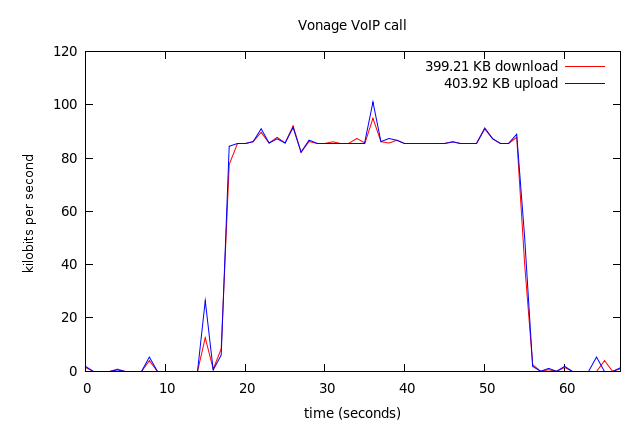
I was a little surprised to see that Vonage telephone calls use so much bandwidth. I looked at my service settings on the Vonage web site, and my service is indeed configured to use “high quality” audio which uses a nominal bitrate of 90kbps in each direction. This is astonishing, since traditional POTS phone service uses a 64kbps audio channel (8Khz 8-bit sampling). It turns out that by default, Vonage does not use audio compression [1], and encodes audio using the raw PCM format. [2] I'm probably not getting much benefit from this high quality stream, since I'm using a POTS telephone which limits me to the low-quality 8Khz audio that telephone users have experienced for decades. Some day, I would love to ditch the POTS bottleneck altogether, since I've found that hi-fi audio conferencing is much more pleasant.
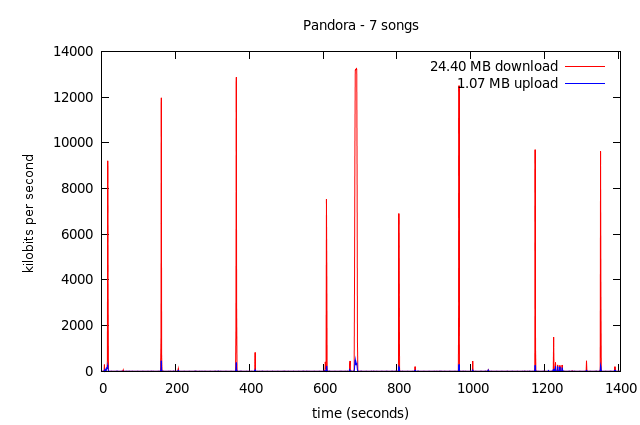
There's nothing too surprising about the Pandora bandwidth usage. From the looks of the graph, it's downloading each song in a quick burst at some point before the scheduled playback.
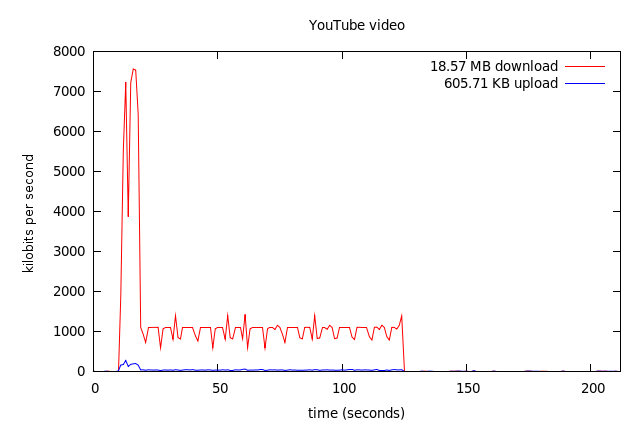
YouTube seems to be very front-heavy, filling a large buffer at the start and topping off the buffer periodically. From the length of the quiet area at the tail of the video, I'd guess that the buffer size in this test was about 78 seconds or 7.5MB.
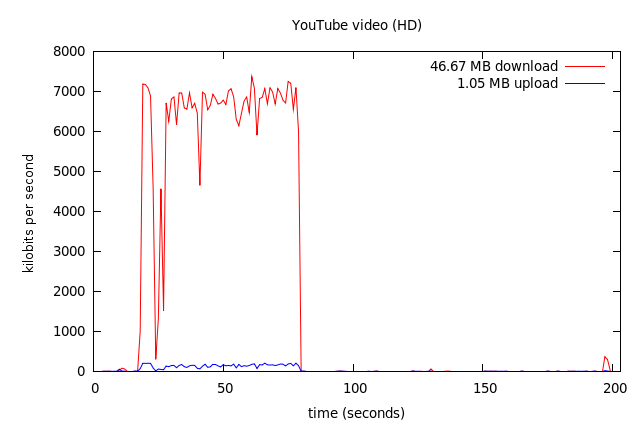
As expected, watching YouTube video with the HD option uses more bandwidth. The buffer in this case seems to be around 123 seconds or 30MB.
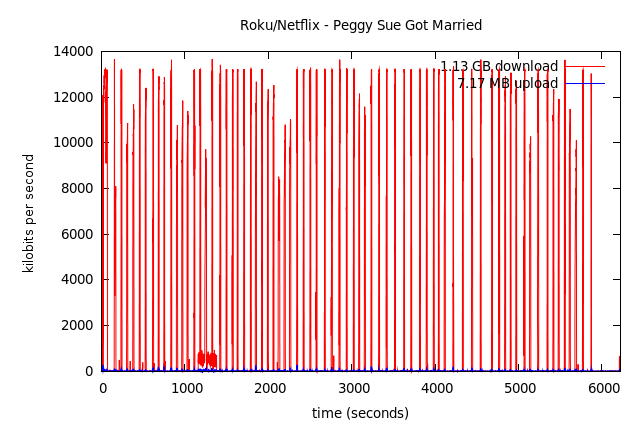
The above test was performed with a Roku HD-XR set-top box streaming a feature-length film from Netflix. The bandwidth usage is extremely bursty, with the Roku box taking large gulps from the stream periodically. Note that the interval between bursts does not reveal the buffer size, since the box is only “topping off” its buffer at these times. However, from the quiet area at the tail of the graph, we can surmise a ballpark estimate of about 350 seconds or 64MB.
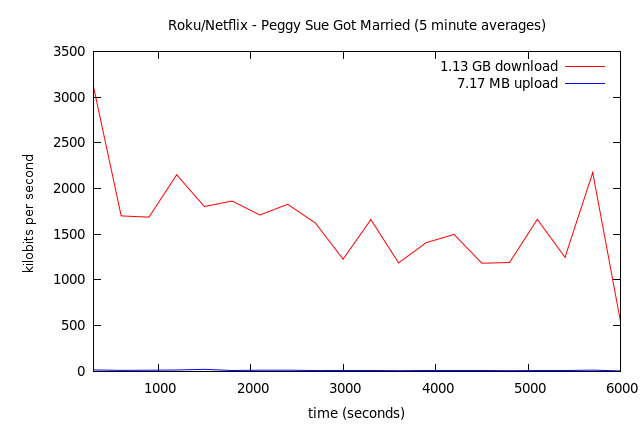
Because the burstiness of the first Netflix graph doesn't convey the general bandwidth usage very well, I created this second graph which uses 5-minute averages instead of 1-second averages. This graph represents the same viewing session as the first, but with the bandwidth usage smoothed out. The average bitrate is around 1.5Mbps.
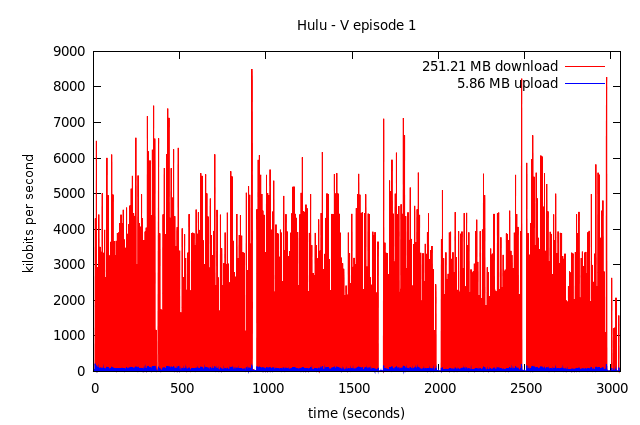
Here's another bursty graph representing the viewing of a TV show on Hulu. I believe the empty intervals within the show correspond to advertisement breaks. Interestingly, it seems that Hulu buffers the advertising in advance, and does not use the network for the duration of the advertisement.
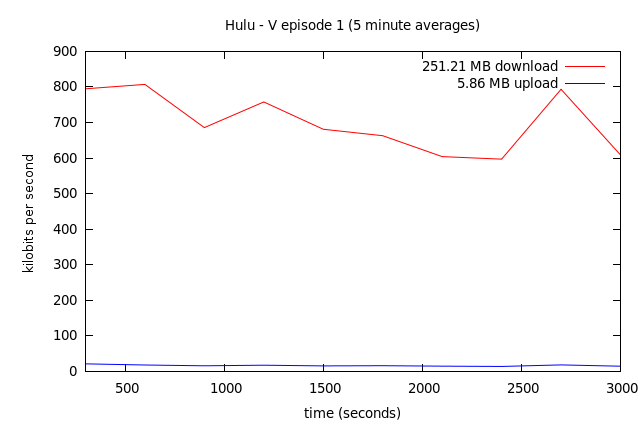
Here's the smoothed version of the Hulu graph with 5-minute averages. The average bitrate is about 694kbps, which is quite a bit more efficient than Netflix streaming. However, I think the quality was a little lower, and Hulu certainly demands a lot from my computer. My older laptop with a Centrino/Pentium-M processor cannot play Hulu video without skipping, although my newer Core 2 Duo laptop handles it fine.
All tests were performed at the Caffeinated Bitstream testing laboratories at an undisclosed location in the Rocky Mountain region.
Footnotes
- “Vonage utilizes VoIP technology differently from its competition, in that it doesn't compress your voice, so the sound quality is superb.” http://www.vonage.com/how_vonage_works_faq/
- “Vonage uses the standard PCM audio codec by default because people prefer it.” http://www.interesting-people.org/archives/interesting-people/200407/msg00231.html
posted at 2009-11-25 17:34:41 MST
by David Simmons
tags: video audio streaming multimedia bandwidth
permalink
comments